 Cortex
Why another browser?
Fair question. Here's the honest answer.
You know the state.
A hundred tabs, spread across three windows, because closing any of them feels like losing something. A work profile and a personal profile, switched by hand, every time. Maybe a second browser entirely, just for gaming, because the first one got too heavy to trust with anything performance-sensitive. And every single one of those tabs — read hours ago, forgotten, never closed — quietly eating RAM in the background whether you're looking at it or not.
Tab groups were supposed to fix this. They didn't, not really. A group is a colored label on the same old mess: the tabs inside it still run, still hold memory, still share one undifferentiated session with everything else in the window. You've organized the clutter. You haven't solved it.
Tab groups are visual. Contexts are real.
| Tab groups (Chrome/Edge/Firefox) | Cortex contexts | |
|---|---|---|
| Visual grouping | ✓ | ✓ |
| Frees memory when you leave a group | ✗ | ✓ automatic |
| Per-group ad-block, search & preferences | ✗ | ✓ |
| Per-group session isolation (opt-in) | ✗ separate profiles | ✓ same window |
| Built-in software per group | ✗ | ✓ quick-launch |
| Business model | Ads / data | You're not the product |
How suspension actually works
When you leave a context, Cortex doesn't just hide its tabs — it destroys the renderer processes behind them. That's where the memory actually goes. What survives is the lightweight stuff: URL, title, scroll position and back/forward history, kept and quietly rebuilt the instant you switch back. It looks instant because the part that's expensive was never resident in the first place.
Suspension is also careful about what it touches. A tab playing audio, or one where you've started filling out a form, is exempt — Cortex leaves it running until you're actually done with it.
Opt-in everything
Your data is never sold or monetized — utility and performance are the business model, not extraction. Everything beyond a fast, private browser is something you choose to turn on — with one honest, beta-only exception: anonymous stability telemetry runs by default during the beta so crashes are visible to us, comes with a total off switch (Settings → Privacy), and will be off by default at full release.
Built by a developer who needed it
Cortex started before mainstream browsers had tab groups or AI — one developer's answer to living in a hundred tabs at once. Today it's planned, tracked and shipped in the open with UnityFreak, the developer ecosystem platform.
It's not a demo — I run my own work through it every day: six-plus contexts, one per project, real tabs migrated straight from Chrome.
Follow on UnityFreak →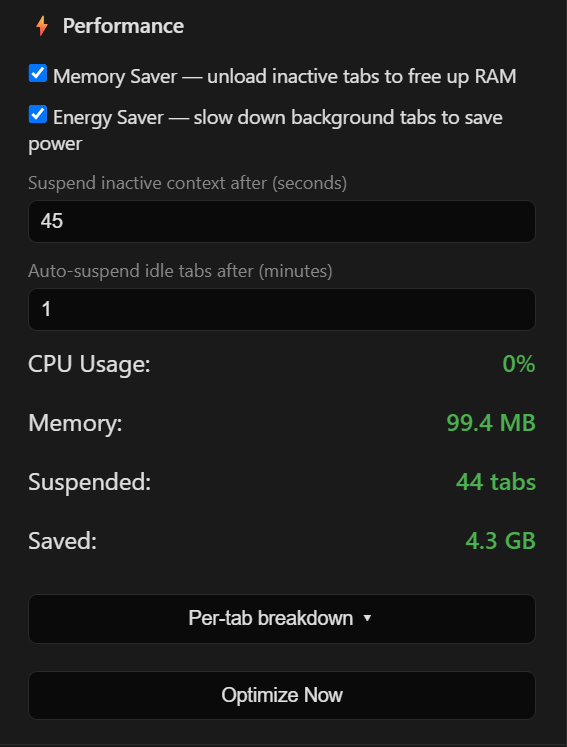
My own Performance panel, mid-workday — not a demo.